
Document engine · self-hosted
Official forms, filled by your own software.
PDF Forge takes the details a business already holds, types them into the real government PDF, checks the finished document is fit to file, and hands it back. It runs on infrastructure the owner controls, so the data never reaches an outside service. Built by Givata to replace a paid form-filling SaaS for a CPA firm, and in production since.
Next.js, Postgres and a pinned US region · no browser and no HTML renderer anywhere in the fill path
The trailer
Ninety seconds, every feature.
The app sits behind a sign-in, so this is the tour. Everything on screen is the real software running invented sample data.
Every client, name, number and identifier shown is invented sample data.
What it is
A form filler that treats a finished document as something to be proved, not assumed.
Underneath, it is one engine: open the real PDF, write into the boxes the government actually put there, and measure what came out. Everything else on this page is that idea applied - the library that pins each form to a fingerprint, the gate that refuses a document nobody could read off a fax, the run record that proves what happened.
Before
- Client name, address and taxpayer numbers sent to a third-party SaaS
- Form templates living in someone else's account
- A monthly bill per template tier and per document
- No way to know a government form had been republished
- A wrong-looking form found by the person signing it, or by the agency
After
- Nothing leaves the building - filled in memory, on the owner's own server
- The forms and their field maps live in the owner's repository
- No subscription, no per-document charge
- A weekly fingerprint check that raises a banner the moment a form changes
- A document that is measured before it is handed back, or not handed back at all
The engine
Fill, merge, split, stamp, watermark, inspect.
One HTTP call per job, and the finished document comes straight back in the response. There is no queue to poll, no storage bucket to clean up, and nothing kept afterwards.
A request in, a document out.
The API is a drop-in for the paid service it replaced, so the automations that were already calling that service kept working with a changed address and a new key. Extension routes sit alongside it for the things a general-purpose vendor would never build: named forms with real field mappings, checked and tested per form.
- Fill any fillable PDF from JSON, by box name
- Named forms with hand-written, tested mappings
- Merge a packet, split pages back out
- Stamp text by coordinate, watermark a draft
- Read a document's pages and box inventory
- Same input, byte-identical output, every time
# one call, and the response body IS the document
curl -X POST https://forms.your-company.example/v1/x/fill-form \
  -H "X-API-KEY: $FORGE_KEY" \
  -d '{ "form": "f2848", "data": { … } }' \
  -o filled.pdf

HTTP/1.1 200 OK
content-type: application/pdf
content-disposition: attachment; filename="f2848.pdf"
x-pdf-forge-fields:   16
x-pdf-forge-pages:    2
x-pdf-forge-warnings: 4
x-request-id:         0e4cfd1c-aa08-4f8e-a303-b63fa9ee084f
A real response from the running app. Counts and timings come back on the headers, so a caller can log the run without opening the document.
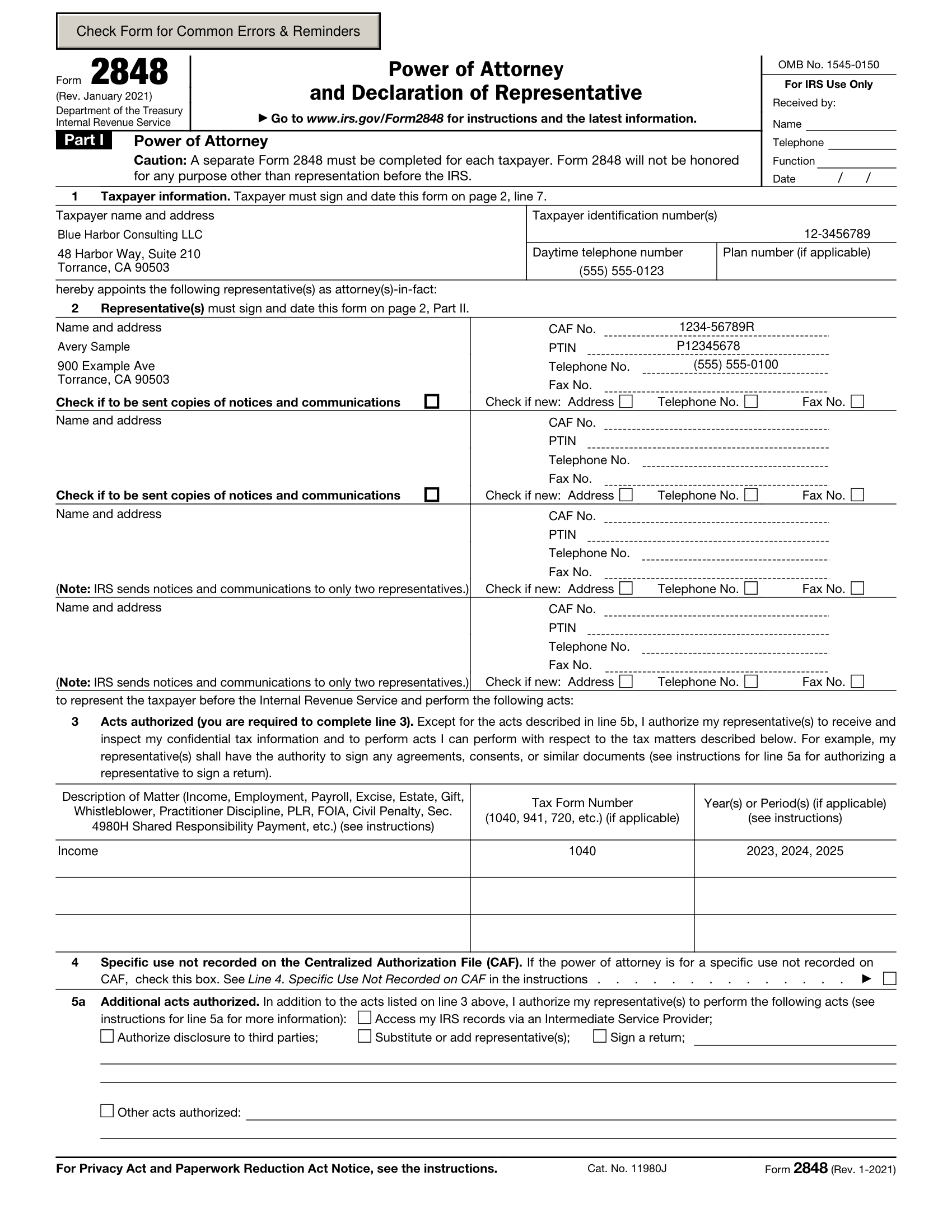
The output: a real government form, filled and ready for signature. Every detail on it is invented.
The filing gate
It reads back the document it just made, and refuses the ones that would fail.
Most form fillers report on their own intentions - the field was set, so the job worked. This one re-opens the bytes it produced and asks five questions of every box carrying a value. A no to any of them means no document at all, and a message naming the box.
drawn
Does the box actually paint text, or is the value only stored?
faithful
Does what is painted match what was stored, character for character?
inside
Is every glyph inside its box, ascender and descender included?
legible
Is the type at least 6pt? These documents get faxed and scanned at 200dpi.
no_orphan_lines
Does every line land inside the box, with nothing spilling past the edge?
The refusal is the feature.
A company name too long for its box is the classic case. Shrinking the type until it fits produces a document that looks right on screen and is unreadable on the copy the agency actually receives. Many of these boxes are centred, so an over-long value loses its beginning as well as its end and what survives looks like a different, plausible value.
So the engine stops, returns nothing, and explains which box, how many characters it holds, and why. There is no flag to switch it off, and the time it took is written to the run record, so a completed filing carries the evidence it was measured.
HTTP/1.1 422 Unprocessable Entity
{
  "status": "error",
  "code": "validation_failed",
  "message": "…1 problem(s) must be fixed.
              No document was produced.",
  "issues": [{
    "severity": "error",
    "path": "taxpayer.businessName",
    "message": "This value does not fit the box
      (line 1 taxpayer name, page 1 box 2). It is 201
      characters and the box holds about 110 of them at
      6 pt, the smallest size that still reads on a scan.
      Nothing was written to it. …Shorten it and send it
      again, or file the detail as an attachment."
  }]
}
Verbatim from the running app. The message names the box and the limit - never the value that was in it.
Form integrity
Every form is pinned to a fingerprint, and watched.
Agencies republish forms without announcing it, and a box that moved is how a taxpayer number ends up in the wrong field. Each form here is pinned to a SHA-256 of the exact file that was mapped.
If the file changes, filling stops.
The fingerprint is recalculated every time the library page is opened, and a scheduled job re-downloads each form from the agency once a week and compares. A mismatch raises a banner on the dashboard and halts generation for that form until a person has checked the new layout box by box. Stopping is the correct behaviour, and it is deliberate.
- Pinned fingerprint and live fingerprint, side by side
- A link to the official copy, to check it yourself
- A weekly re-check, and a banner when one drifts
- Box names extracted from the real file, never guessed
- A new blank form can be registered without a code change
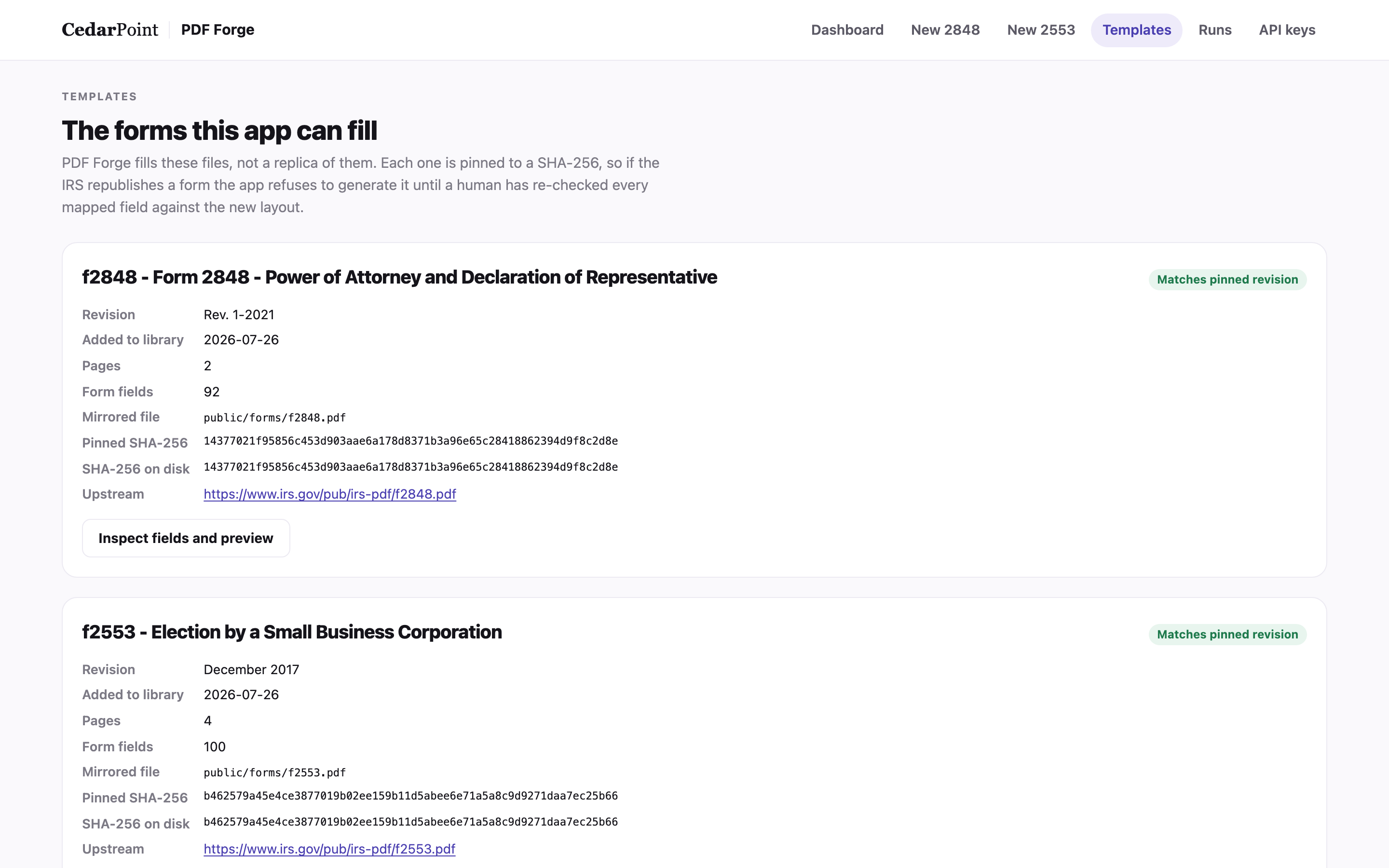
The library. Both fingerprints shown, so "it matches" is checkable rather than claimed.
See where every box actually sits.
The inspector draws each fillable box over a picture of the page and numbers it. Click one and it tells you its internal name and how it behaves. Beside it, a sample payload you can edit and fill for real - the document comes back in the browser tab and is discarded when the tab closes.
This is the screen that makes a mapping arguable instead of mysterious. It is also the screen most likely to be on a shared display, which is why the app tells you, on the page, to use invented clients on it.
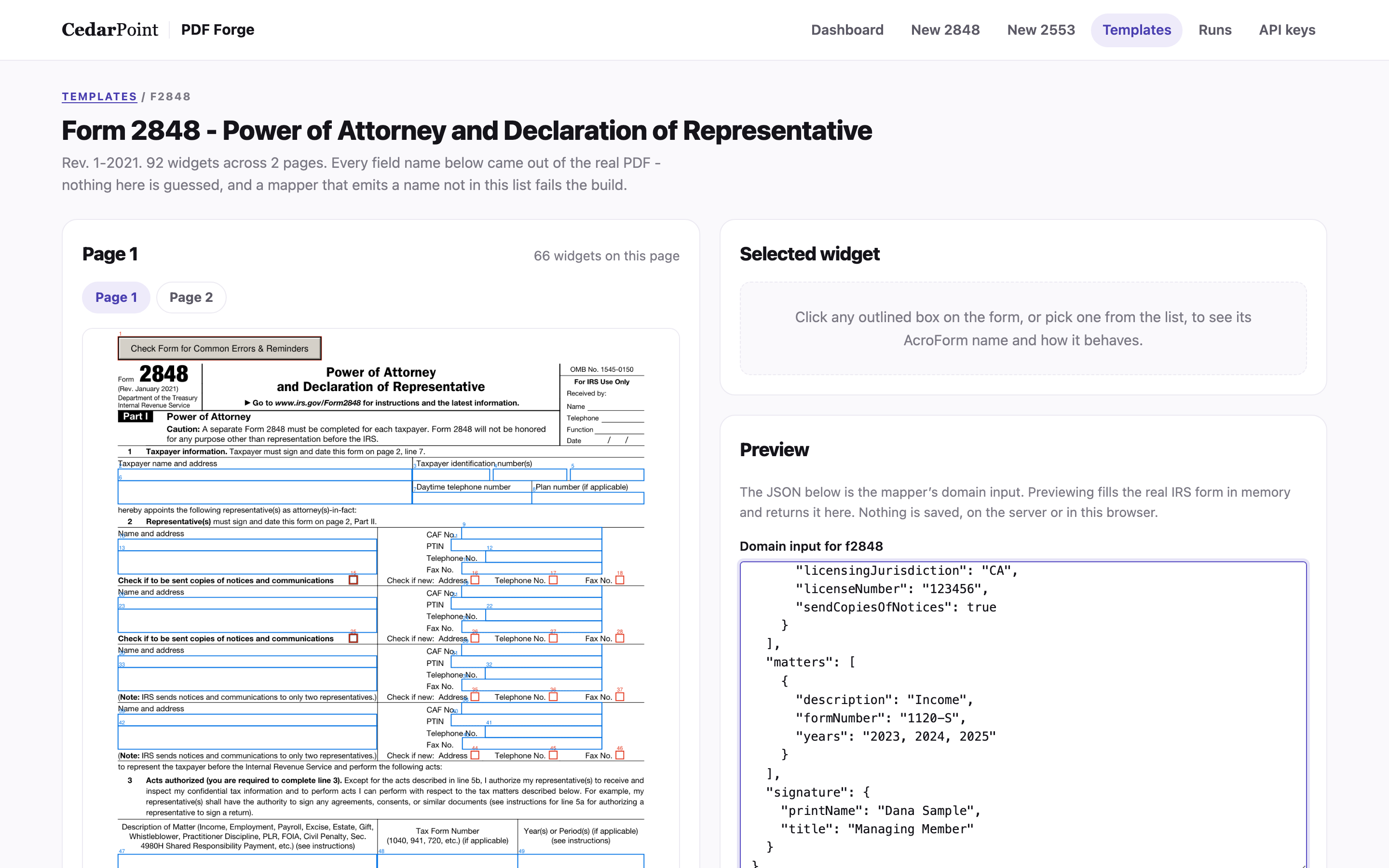
92 boxes across two pages, each one addressable by its real name.
The human path
For the forms a person fills in, a screen shaped like the form.
Not every document starts from an automation. The entry pages follow the printed form's own line numbers, so the person filling it can check the screen against the paper as they go.
Look it up, check it, file it.
Search the practice system by account number or name and the address, phone and business number drop in. Anything already typed is left alone, so a correction is never quietly overwritten by a lookup. Directory entries fill the repeated professional details, which is why a registration number cannot be mistyped onto a filing.
- Lookup by partial account number or by name
- A directory for the repeated professional details
- Pickers for the coded fields, so nothing is free-typed twice
- The tracking record is written back automatically, already marked done
- Make it, read it, then file it to the client's folder - in that order
- Nothing is saved as you type, on purpose
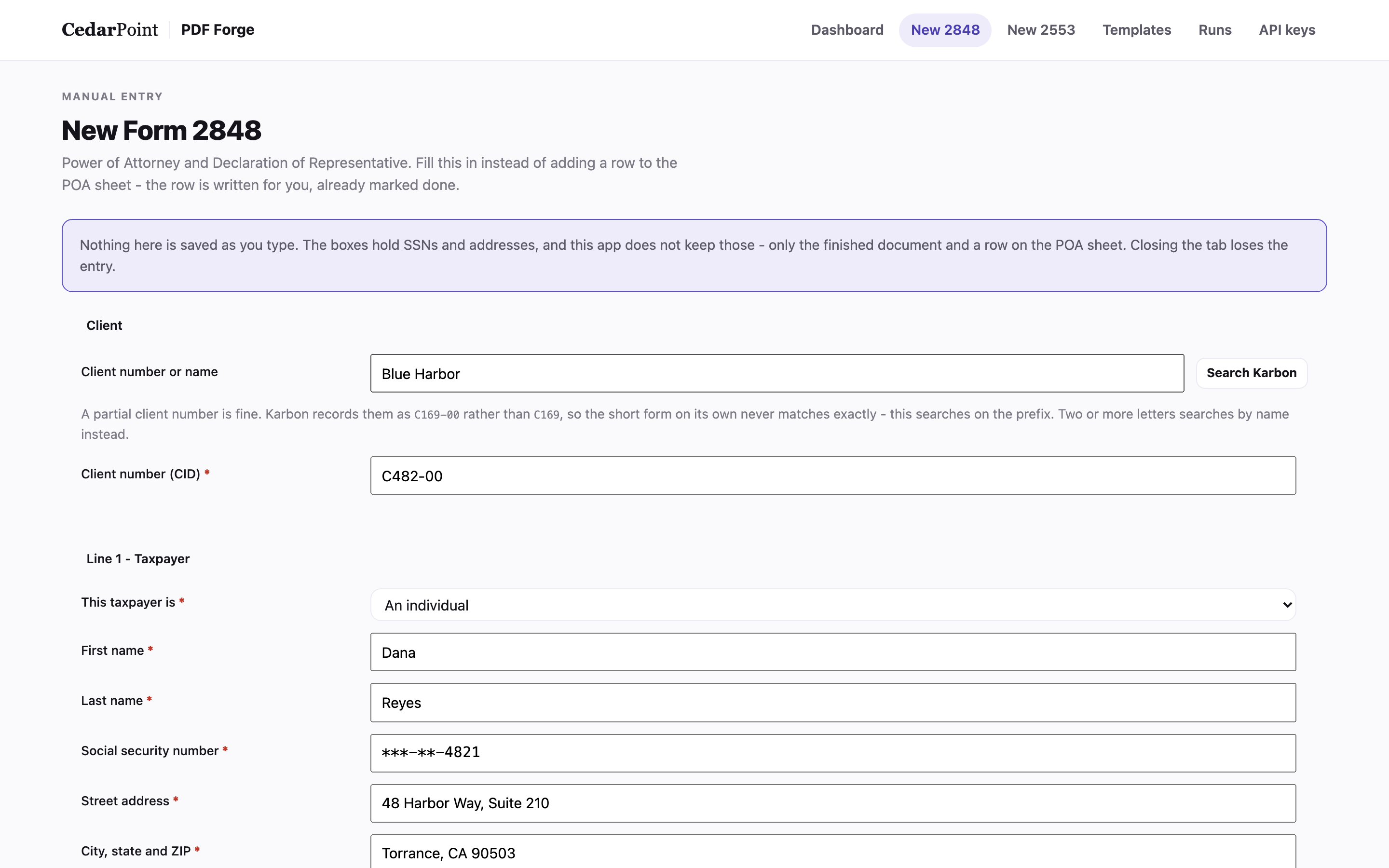
Sample details throughout. The identifier is deliberately masked, even here.
The payload is checked before a document exists.
Ahead of the filing gate there is a validation pass that reads the whole submission the way the form does. It catches a number with the wrong digit count, a field name that is not on this form at all, a required box with nothing to write from, and the parts a person still has to complete by hand.
The messages are written for the person reading them. Errors stop the document. Warnings tell you what will be blank and why, which is usually the answer to a question somebody was about to ask.
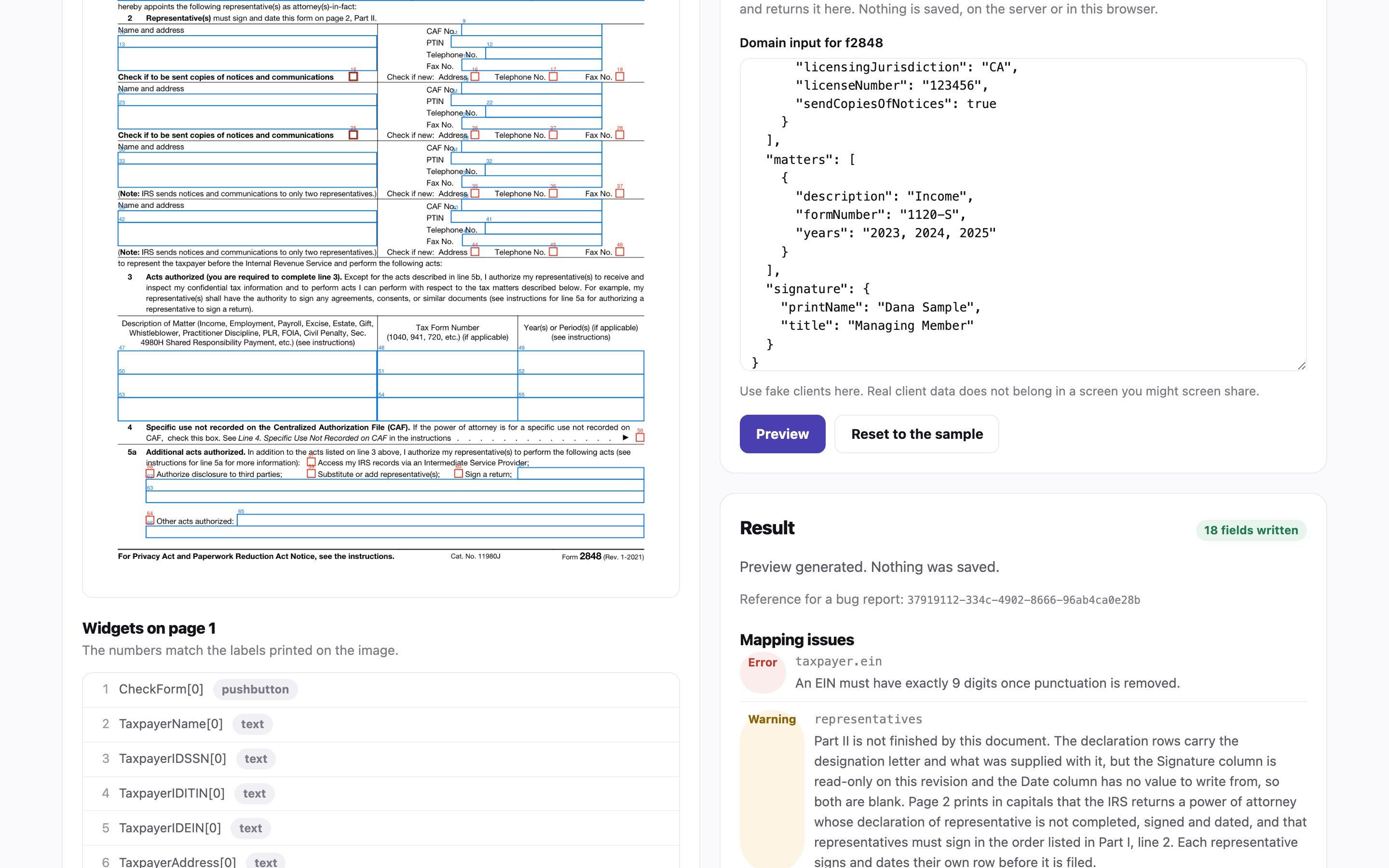
A mis-keyed field name in an automation is otherwise indistinguishable from not sending it.
Automation surface
One key per caller, scoped to exactly what it needs.
The workflows that generate documents authenticate with keys issued here. A key is shown once, stored only as a hash, and can be renamed, re-scoped, rotated or revoked without touching the others.
Keys you can actually manage.
A leaked key on a document engine is a route to the data it fills, so the console treats key handling as a first-class screen rather than a settings page. Rotate issues a new secret for the same key and kills the old one immediately. Revoke switches it off for good. Both ask first.
- Seven scopes, from fill-only to full admin
- Optional expiry, live and revoked status on every row
- Identify a key from the fragment in a config file
- Per-key rate limits
- The key list is built from the audit trail, not a separate record
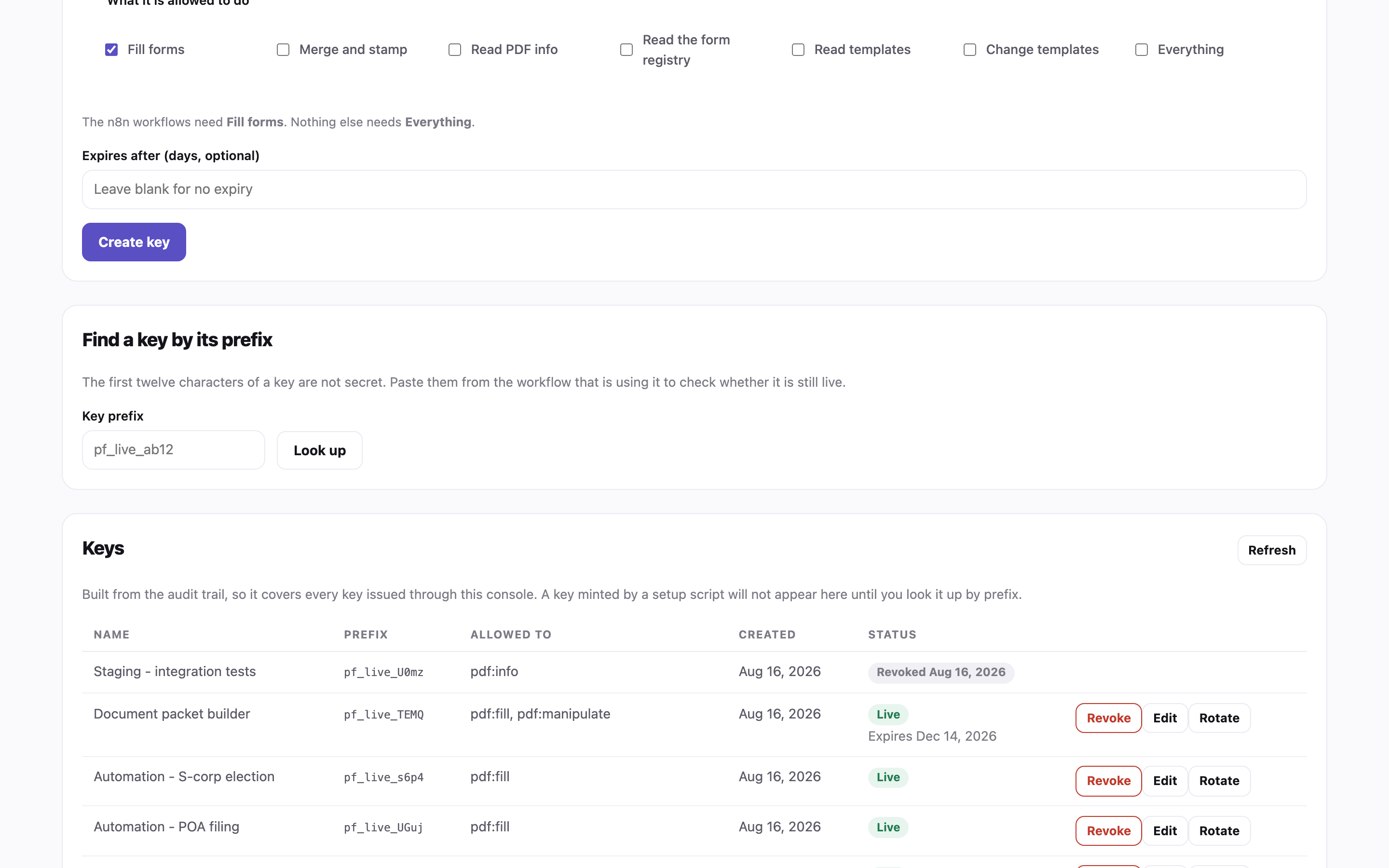
Sample keys. The secret itself is never recoverable from this screen.
The record
Every attempt is written down. Successes too.
An automation nobody can inspect is a liability. One row per attempt, whether it worked or not, with a request id that ties the row to the technical log - so "it did not come through" becomes a question with an answer.
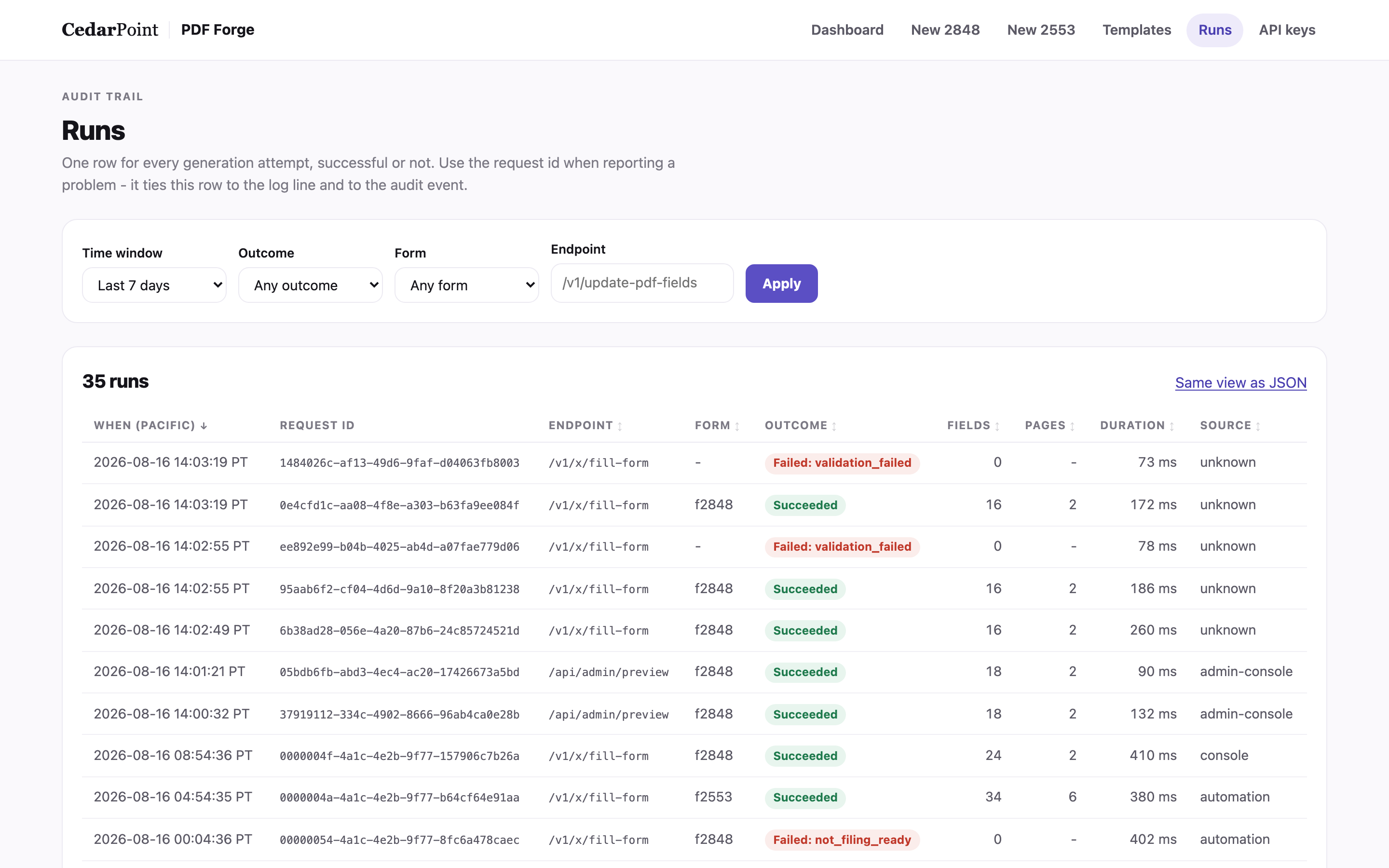
Sample run history. Note what is not here: no names, no numbers, no document contents.
Filter, then share the link
Time window, outcome, form and endpoint. The filter state is the address, so you can send someone the exact rows you are looking at.
Sort on any column
Slowest first, click again to flip. Filters survive the sort.
Counts, never contents
You can see that 26 boxes were filled. You cannot see what was in them, and there is no column that could hold it.
Numbers you can click through
The dashboard's tiles are links. "3 failed" opens the three.
A second copy outside the app
Each run also appends a line to the owner's shared automation log, so the record survives the app.
A reference for every report
Each row carries a request id. Quoting it turns a vague complaint into a specific run.
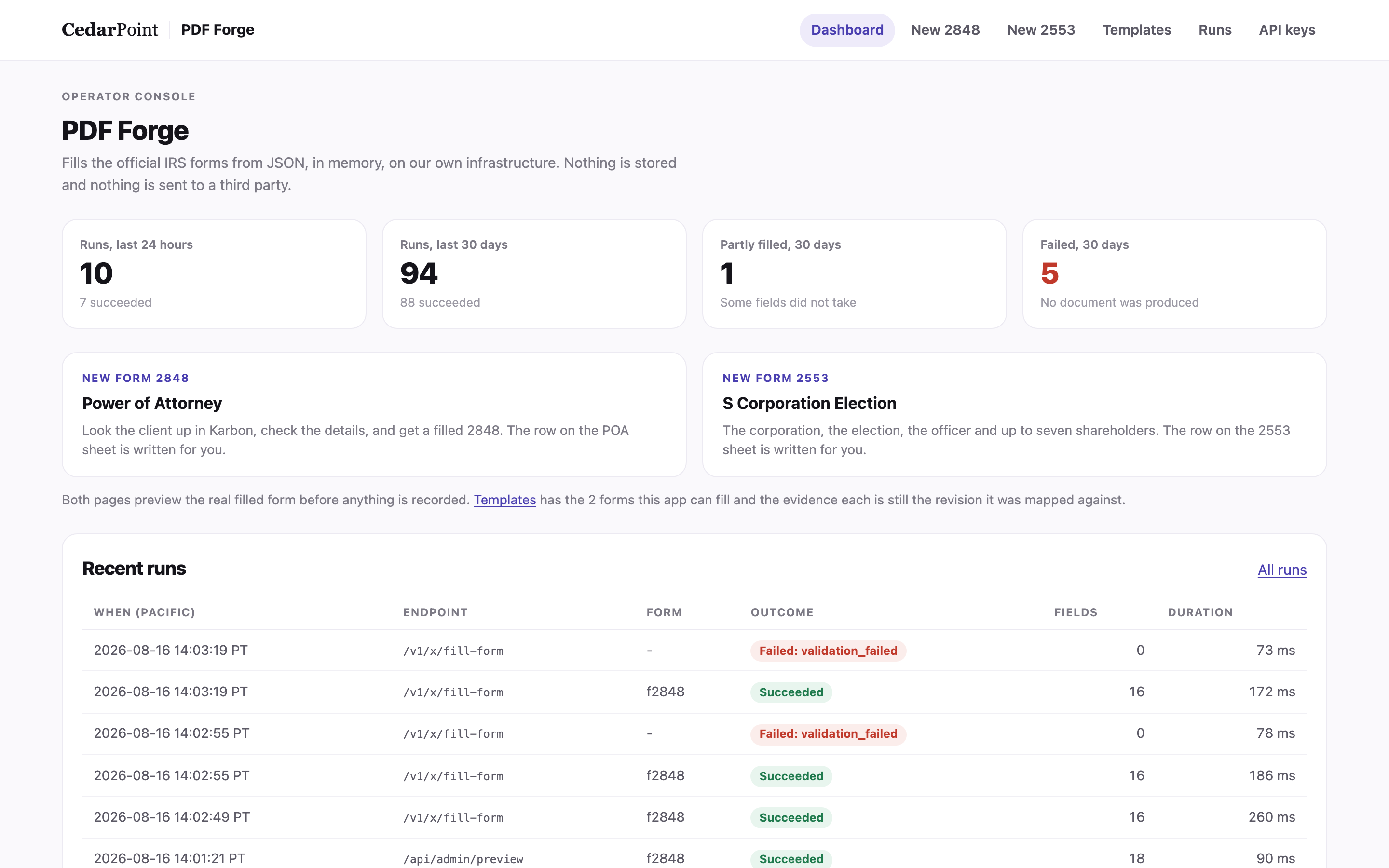
One screen answering "is anything wrong today?", counted fresh on every load.
Why it exists
The data never leaves the owner's infrastructure.
This was the actual reason to build it. Filling these forms through an outside service means the people on them - their names, addresses and identifying numbers - are handed to a third party, sometimes to a server in another country. For a regulated business that transfer is itself a disclosure, and the cheapest way to be sure of it is to not make it.
Filled in memory, then dropped
The payload is processed and discarded when the document is handed back. No document and no field value is ever written to the database.
No values in logs or errors
A message names the box, the limit and the character count. Never the contents. This is enforced at the writer, not left to whoever adds the next route.
Unknown ids are fingerprinted
A field id that does not resolve against the document is caller text, so it comes back as a short hash rather than being echoed.
Region pinned on purpose
Compute is pinned to a single country's region, because for this kind of data, where it is processed is part of whether it is allowed.
Named accounts, not a shared password
Sign-in is an explicit list of addresses, re-checked on every request rather than only at login, so removing someone ends their open tabs.
One outbound call, and it is the owner's own
Filing a finished document to the client's folder goes to the owner's own automation host. The engine holds no storage credentials at all.
Everything else in the box
The rest of what it does.
Two forms mapped by hand
A power of attorney and an S-corporation election, each mapped box by box, each with its own entry screen and its own tests.
Register a form without a deploy
Upload a blank form and fill it by box name. Anything already carrying values is refused rather than stored.
Packet assembly
Merge the filled form with its attachments into one document, and split pages back out when a filing needs them separately.
Draft watermarks
Stamp a document as a draft or a copy before it goes anywhere near a signature.
Plain language for staff, detail for the developer
The same failure produces a readable sentence on screen and a technical line with a request id in the log.
Two ways to start a document
An automation calls the API; a person uses the entry screen. Both run the same engine and land in the same record.
Timestamps in local time
Everything a person reads is in the business's own timezone, not UTC, because that is the timezone the question will be asked in.
Degrades without its database
If the run store is unreachable, documents still generate correctly and the app says so. Losing a history row is bad; failing to produce a filing is worse.
No browser in the fill path
No HTML renderer, no headless browser, no evaluated code. The engine writes into the real document's own fields.
How it was built
Constraints first, then the engine.
The interesting decisions here were all refusals: no browser in the fill path, no guessed field names, no way to disable the gate, no client value in the database. Each one closed off a class of failure that a form filler normally ships with.
Field names come from the file
Every box inventory is extracted from the real document by script and committed. A mapping that emits a name not in that inventory fails the build, so a typo cannot reach a filing.
Tests read the document back
1,661 automated tests, and the fill tests re-open the produced document and compare field by field against golden files rather than trusting the code that wrote them.
Deterministic by design
No timestamps or random ids inside a generated document, so the same input produces byte-identical output and a golden-file comparison actually means something.
Compatible on purpose
The response shape matches the service it replaced, so the cutover was a changed address and a new key rather than a rewrite of the automations.
Reviewed before it shipped
Seven review rounds against the engine, with the deploy-blocking findings closed before the first production filing.
Documented to be handed over
A user guide, an API reference, a workflow diagram and per-form instructions live in the repository. The owner could hand this to another developer tomorrow.
Stack: Next.js and TypeScript, Postgres for metadata only, a pinned US region, and a document library that is a folder of real government PDFs with their fingerprints recorded beside them.
Is your business retyping the same details into the same forms?
That is the shape of problem this solves - and it is rarely only forms. If you have a process where people copy the same data between systems, it is worth an hour to map it.
Book a call with David