 Givata
Search and AI tracking · client work
Find out if the SEO is actually working.
Most businesses pay for SEO and never find out if it worked. SEO Tracker checks every Monday. Does Google show the business? Do ChatGPT, Claude, Gemini, and Perplexity recommend it? It explains what changed and why, and shows which booked calls came from it. Givata built it for a CPA firm.
Built with Next.js and Postgres · checks run every Monday on their own
The trailer
Under a minute, every feature.
The app needs a login, so this video is the tour. It shows the real app tracking a made-up firm.
What it is
One Monday report that answers "is it working?"
People now find businesses two ways: Google, and AI assistants like ChatGPT. SEO Tracker watches both, plus the local map, the website's health, and the calls that came in. Every chart marks what was done and when. So when a number moves, you can see why.
Before
- A monthly SEO bill, and no clear sign it was working
- No idea if ChatGPT or Gemini recommends the firm
- Rankings checked by hand, from the wrong city
- Reports full of charts nobody could read
- No link between search work and booked calls
After
- A weekly check of Google, AI answers, the map, and the site
- Four AI assistants asked the questions clients really ask
- Rankings measured from the firm's own town
- A plain report: what changed, why it matters, what to do next
- Every booked call tagged with where it came from
The overview
The numbers that matter, and what to do next.
One screen shows the key numbers for AI answers and Google. Each number shows what it was a month ago. Below that are this week's top three actions, picked from the data, and what moved since the last check.
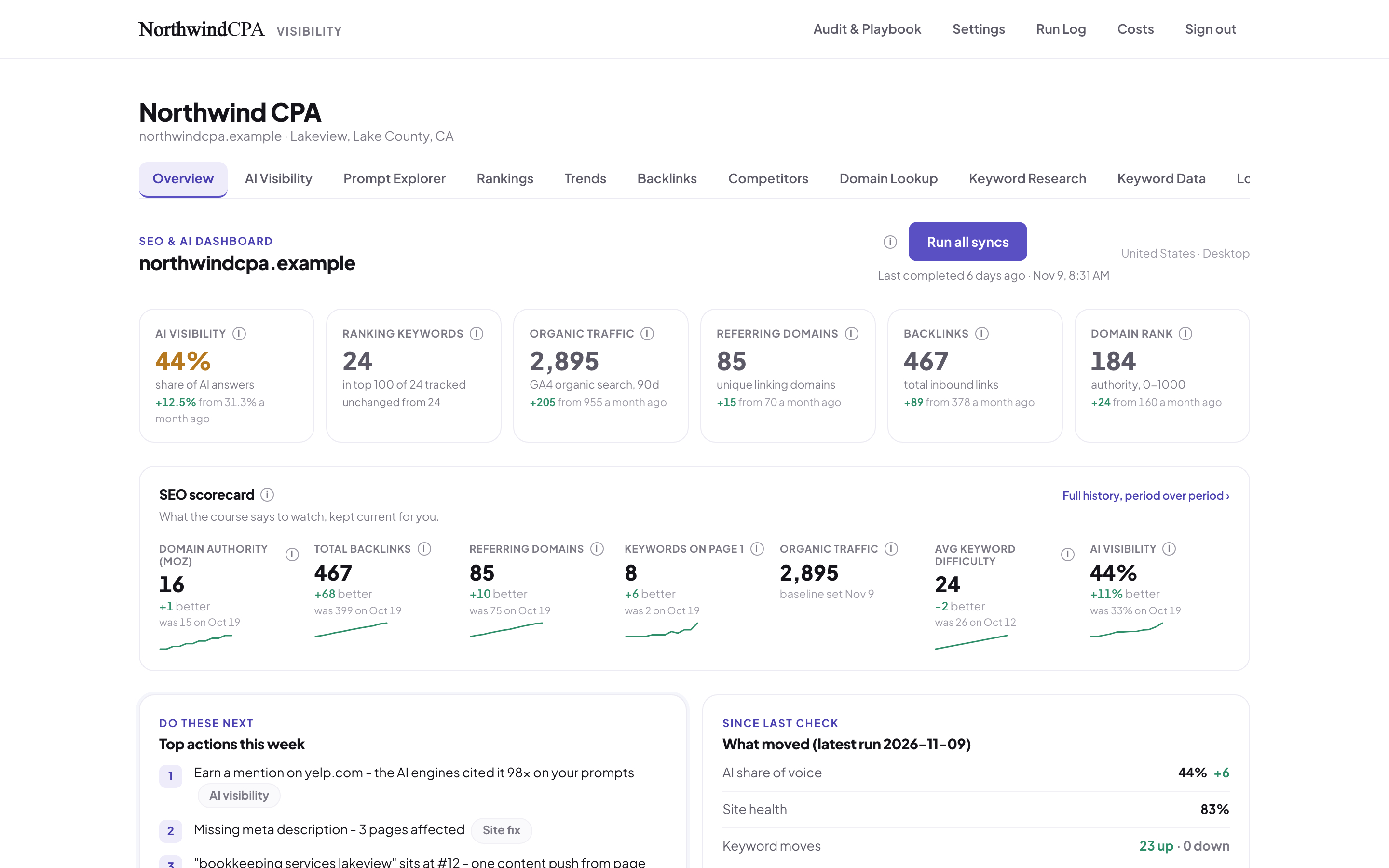
A sample firm's overview. Every number has its month-ago value beside it.
AI visibility
Do the AI assistants recommend you?
Every week, the app asks ChatGPT, Claude, Gemini, and Perplexity the questions a client would ask, like "who's the best CPA for contractors near me?" It records whether each one names the firm, and whether it read and linked the firm's own website.
named
The AI mentioned youYour name is in the answer.
cited
The AI read your siteIt linked your own page as a source.
rivals
Who it named insteadWhich competitors the AI recommends.
sources
Where it lookedThe sites the AI trusts, so you know where to get listed.
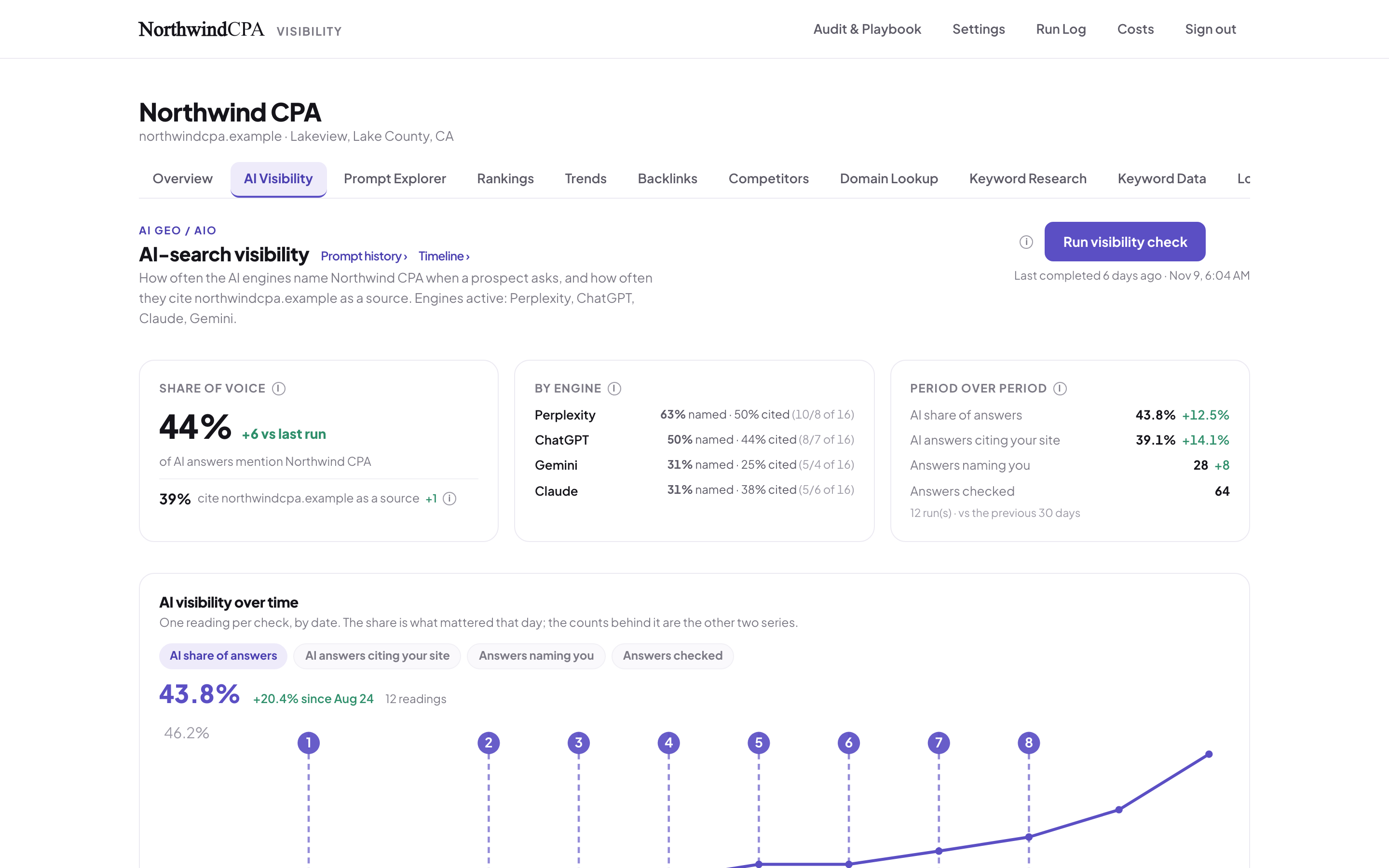
The numbered markers are work that was done. So a jump has a cause.
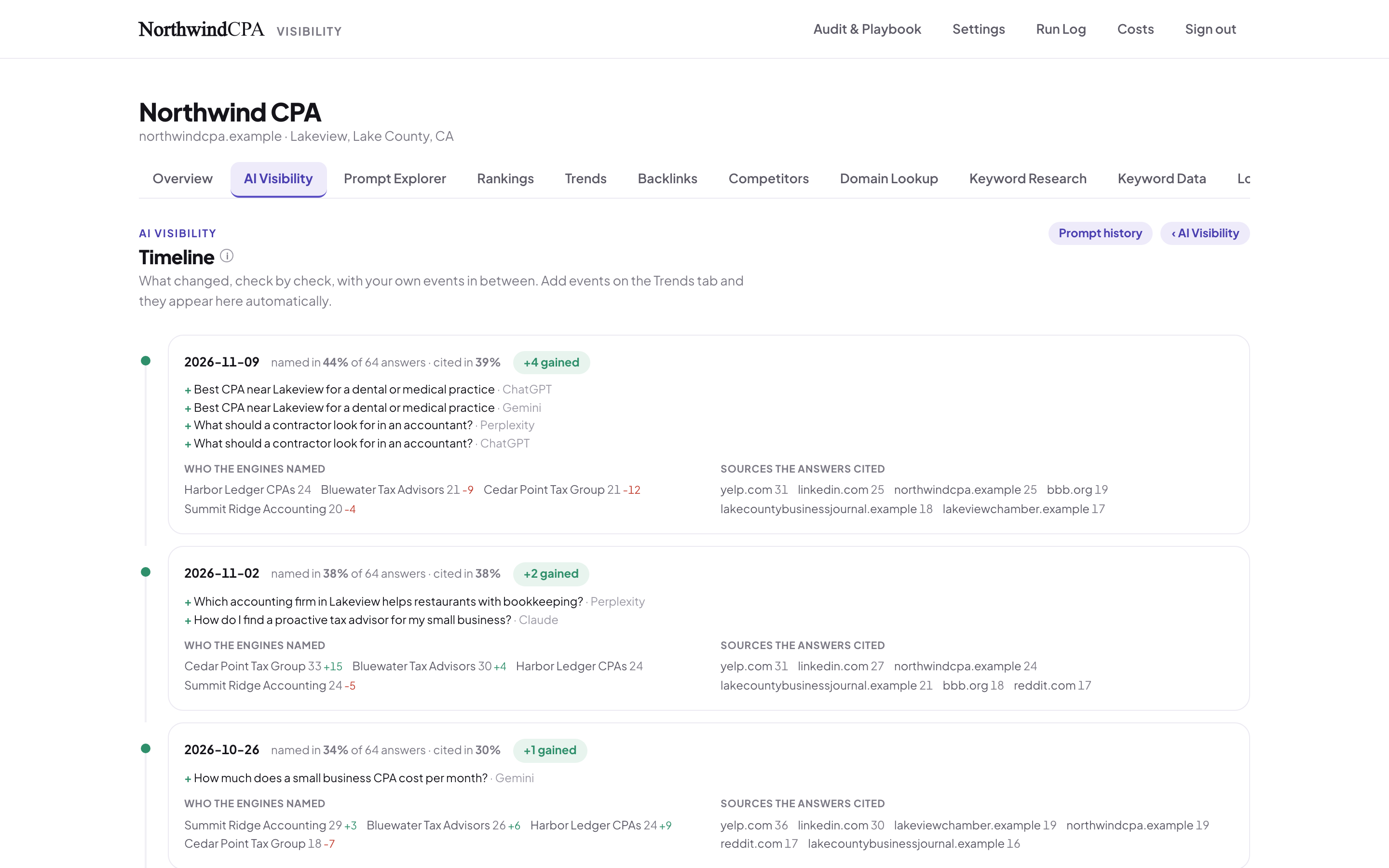
Check by check: answers gained, rivals named, and sources read.
Ask all four at once, and keep the answers.
The Prompt Explorer asks every AI assistant the same question and shows the answers side by side, with the firm highlighted. AI answers change from day to day, so every answer is saved. You can always go back and read exactly what each one said.
When the way something is measured changes, the chart marks it. A change in method is never shown as progress.
- See when each question started or stopped naming the firm
- Every lost or gained answer, with both versions to read
- Suggested questions to track, based on the firm's services
- Visits that came from ChatGPT and the other assistants
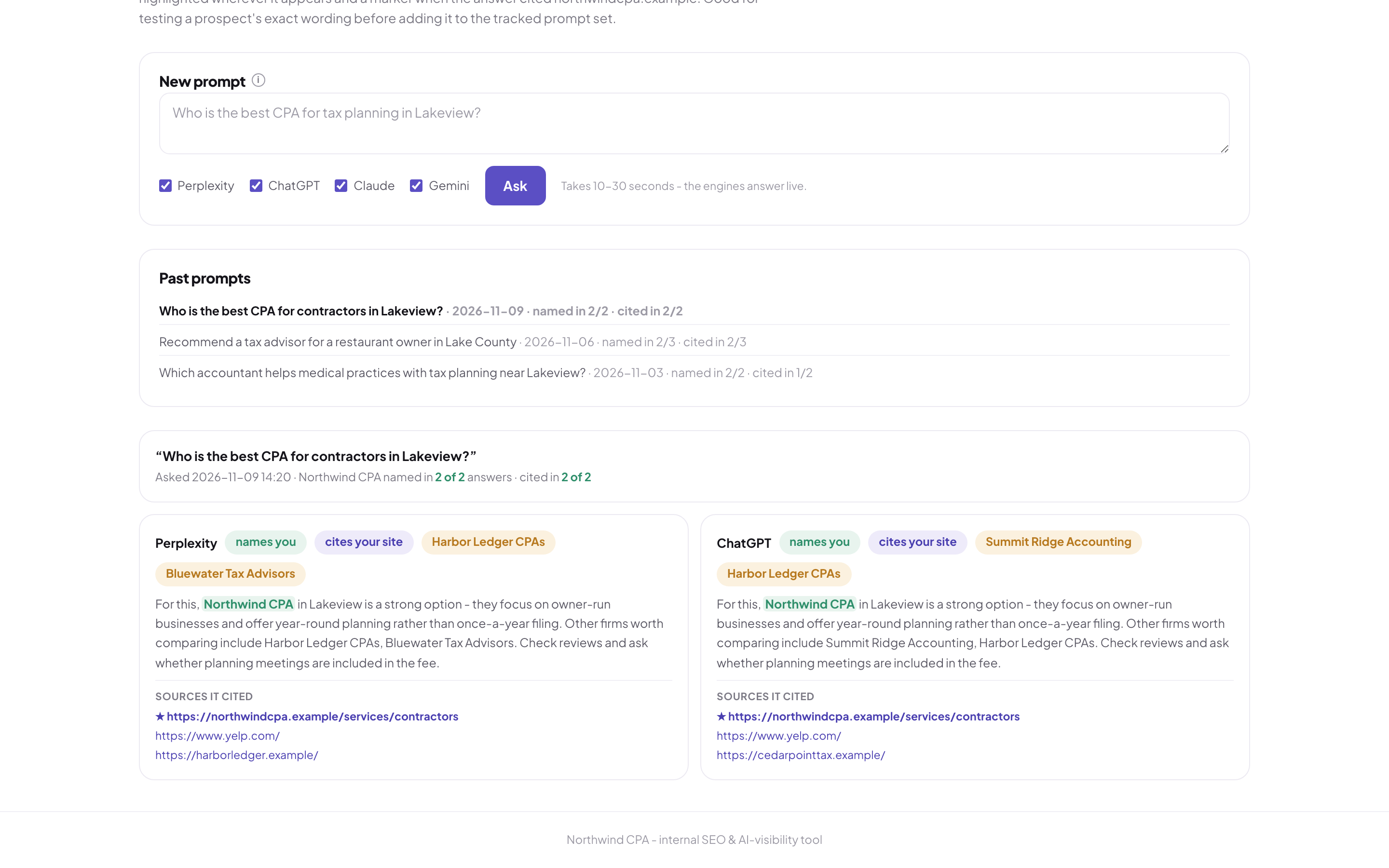
One question, two AI answers. Both named the sample firm and linked its site.
Google rankings and rivals
Where you rank, measured from your own town.
Google shows different results in different places. So rankings are checked from the firm's own city, every week, for every phrase that matters. The chart shows progress over time, so one odd week doesn't fool anyone.
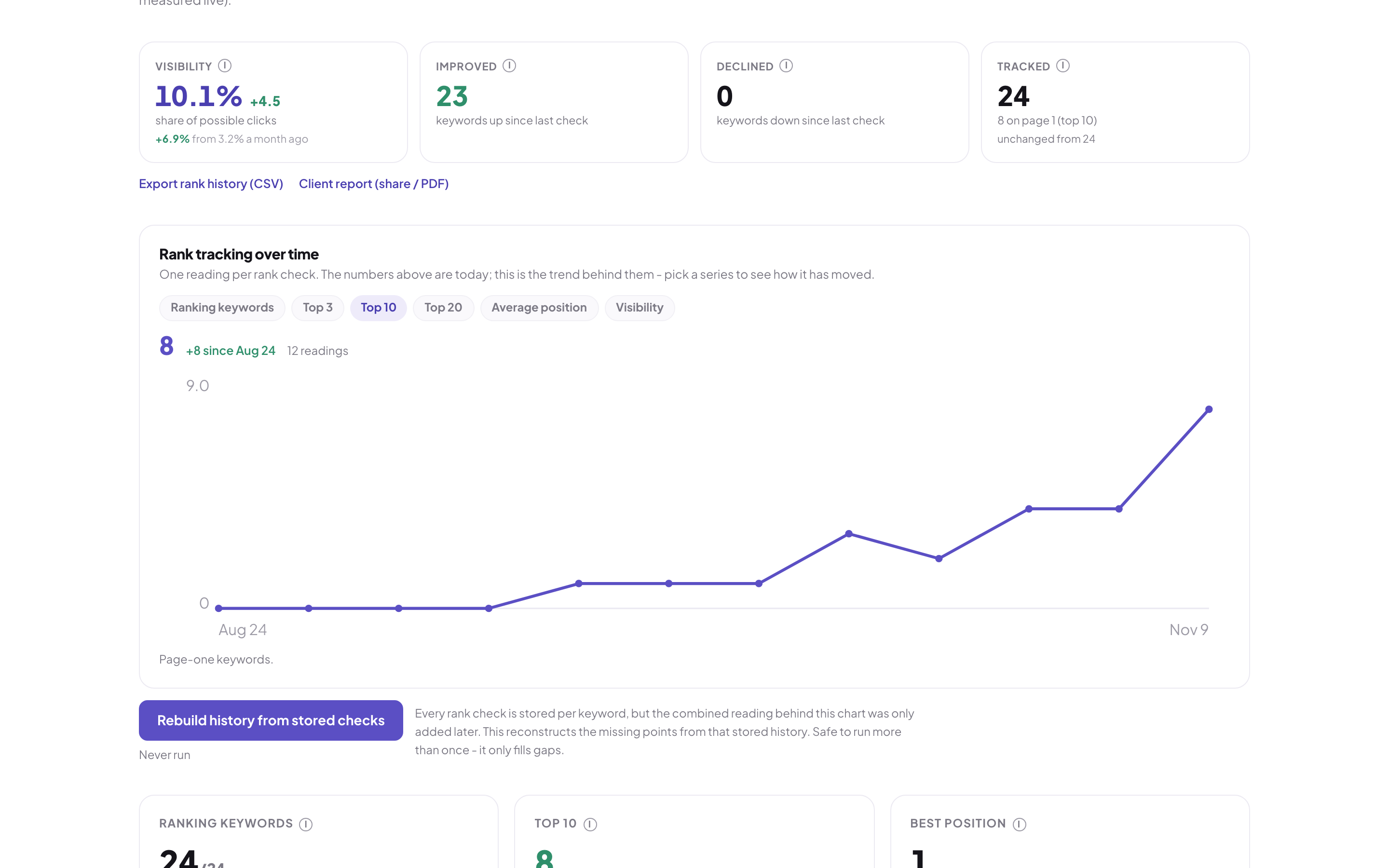
Phrases in the top 10, climbing over twelve weeks.
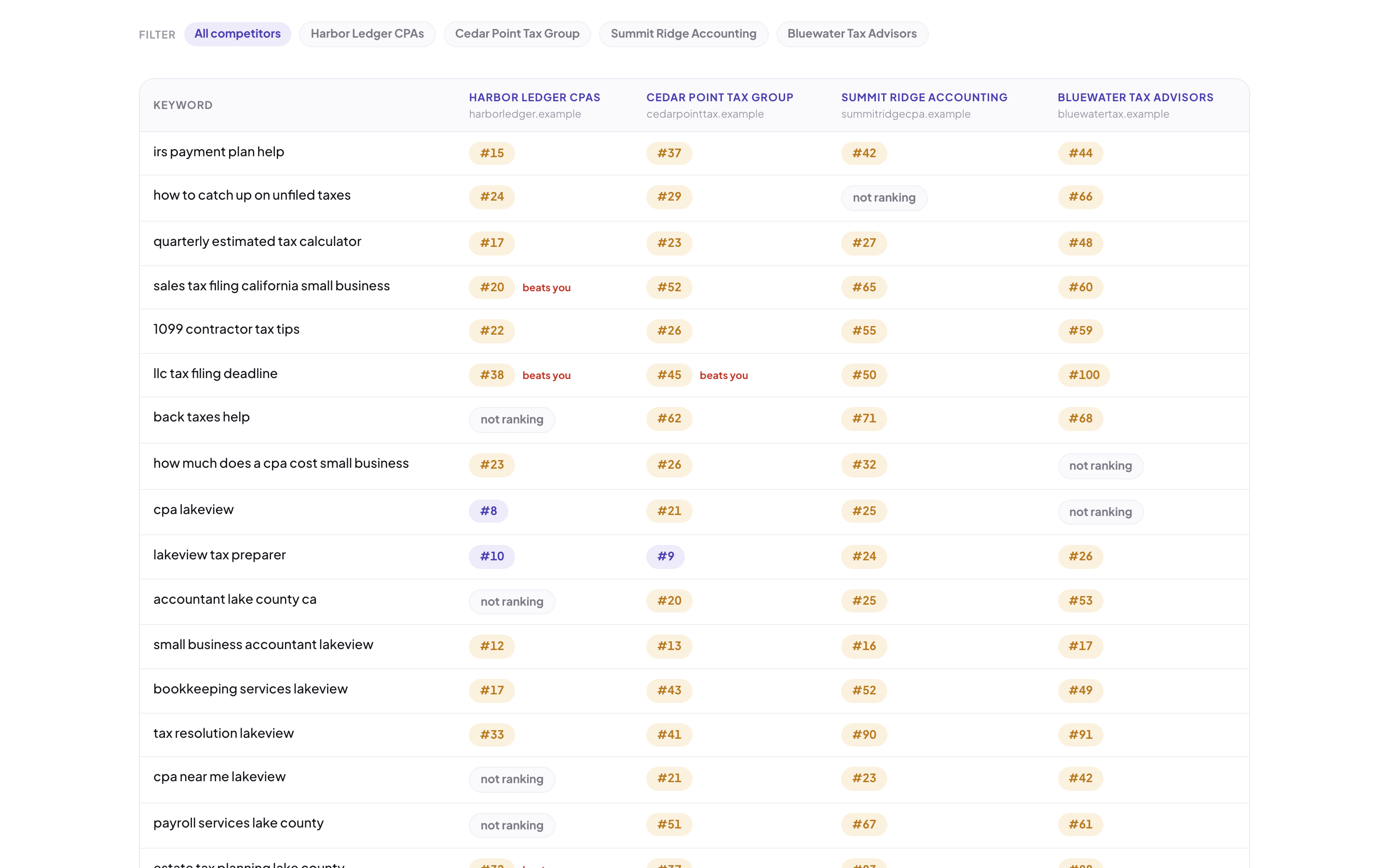
Four made-up rivals, phrase by phrase. "Beats you" flags show where to push.
Google's extra boxes
Whether the firm shows up in Google's AI summary, the map box, "People also ask," or the top answer box.
How hard each phrase is
Every tracked phrase gets a difficulty score each week, with a trend.
What rivals rank for
Phrases rivals show up for that the firm never tracked. Click a rival to see their history.
Look up any website
A one-off check of any prospect's or rival's search footprint.
Find new phrases
Search volume, difficulty, and intent for a topic. Results are saved, so the same search is never paid for twice.
Group and export
Label phrases by service or page, filter them, and export the history as a spreadsheet.
The local map and the website
Where you show up on the map, and what's holding the site back.
The local grid checks the Google map from points around the office, up to 49 of them on a 7 by 7 grid. You can see where the firm shows up in the top three, and where it disappears. Compare grids weeks apart to watch that reach grow.
A weekly health grade for the site.
Each week the app crawls the website and gives it a score out of 100 across seven areas. It lists what was fixed since last week, what's new, and what's still open. It checks page speed and the Google Business Profile, and gives a plain fix for each problem.
- Problems sorted from critical to low
- Page speed scores from Google
- A Business Profile checklist, tracked over time
- Which websites link to the firm, and a weekly authority score
- A monthly check of what the firm's whole online presence says about it
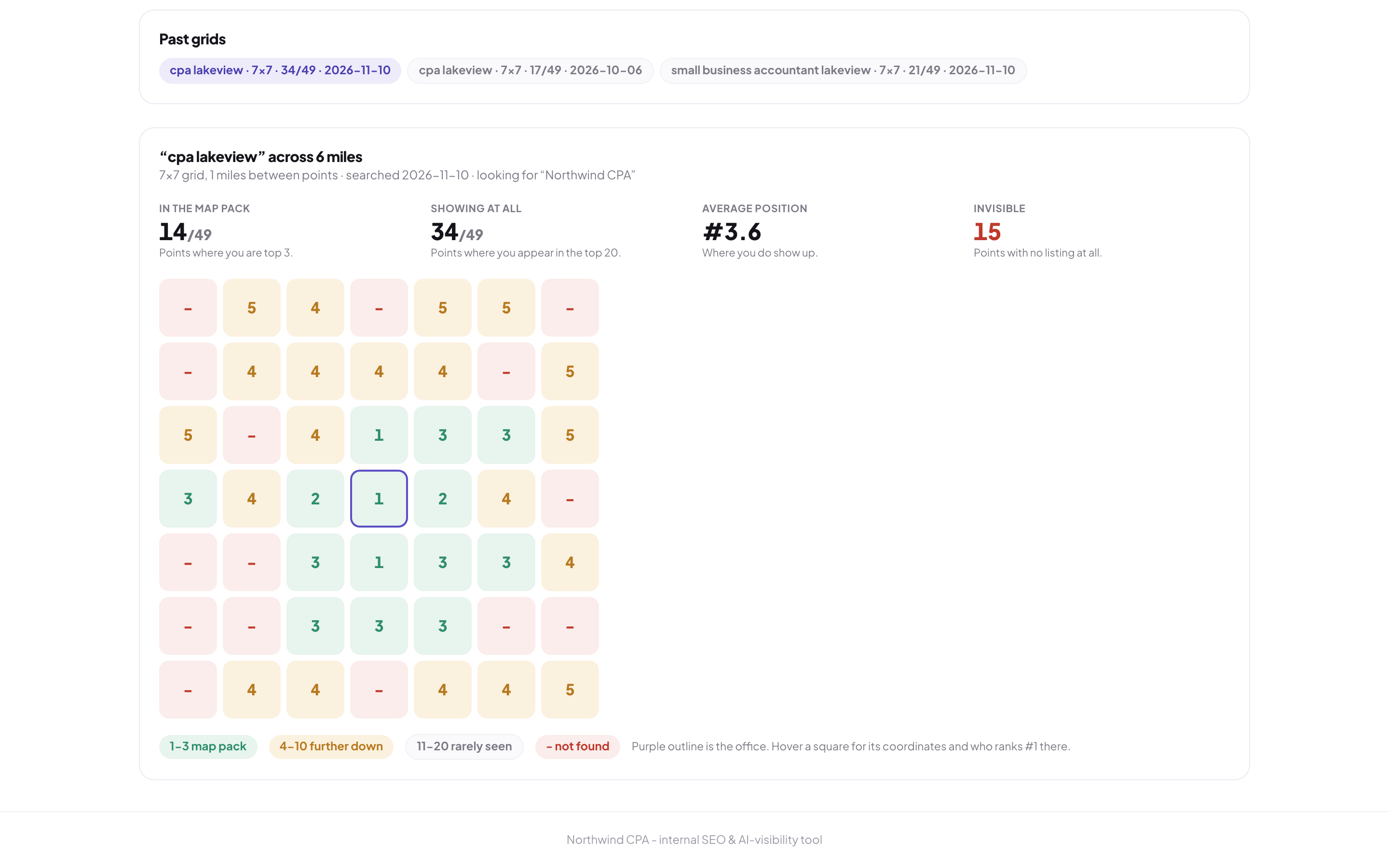
In the top three at 14 of 49 points. The outlined square is the office.
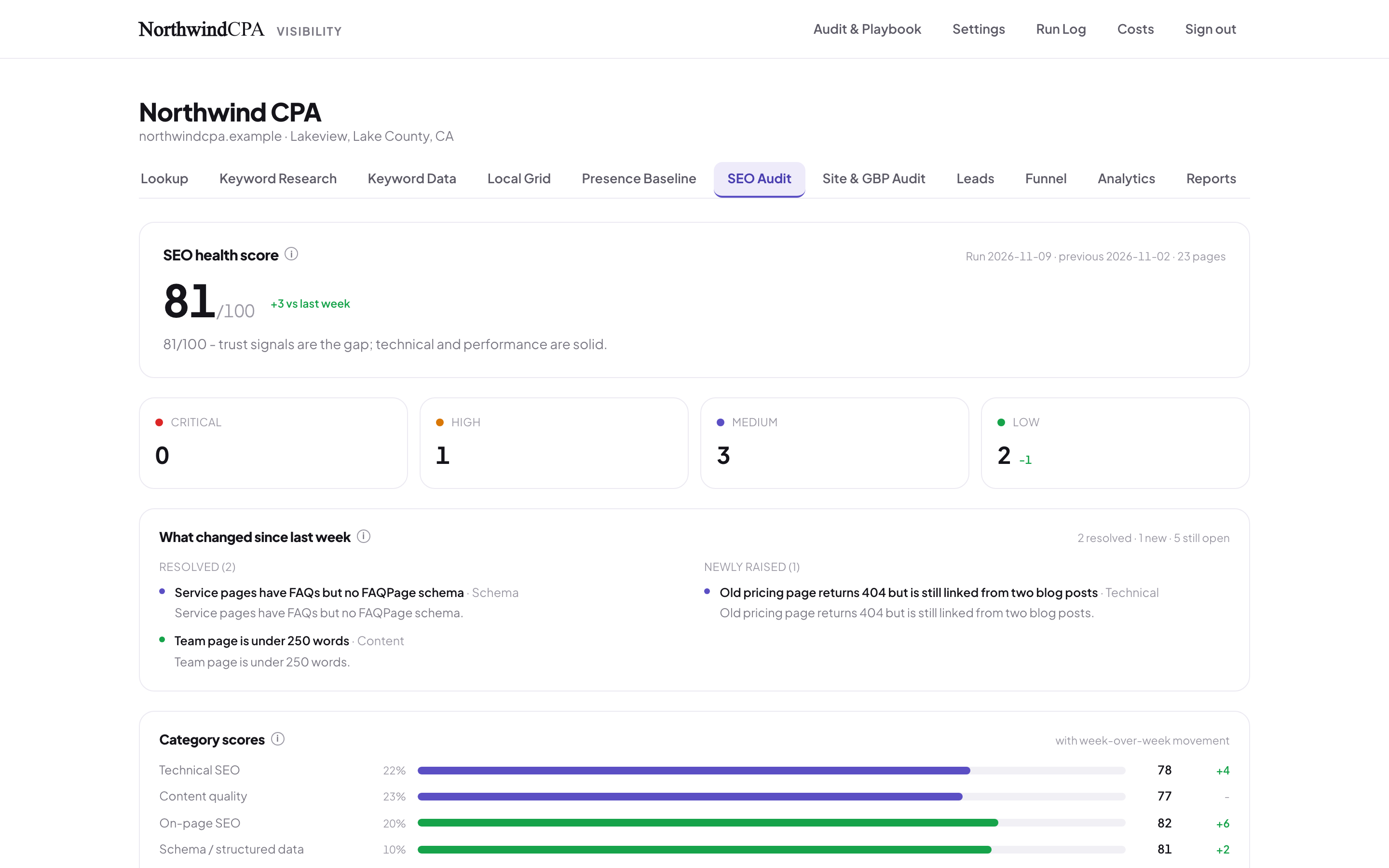
The weekly grade, and what changed since last week.
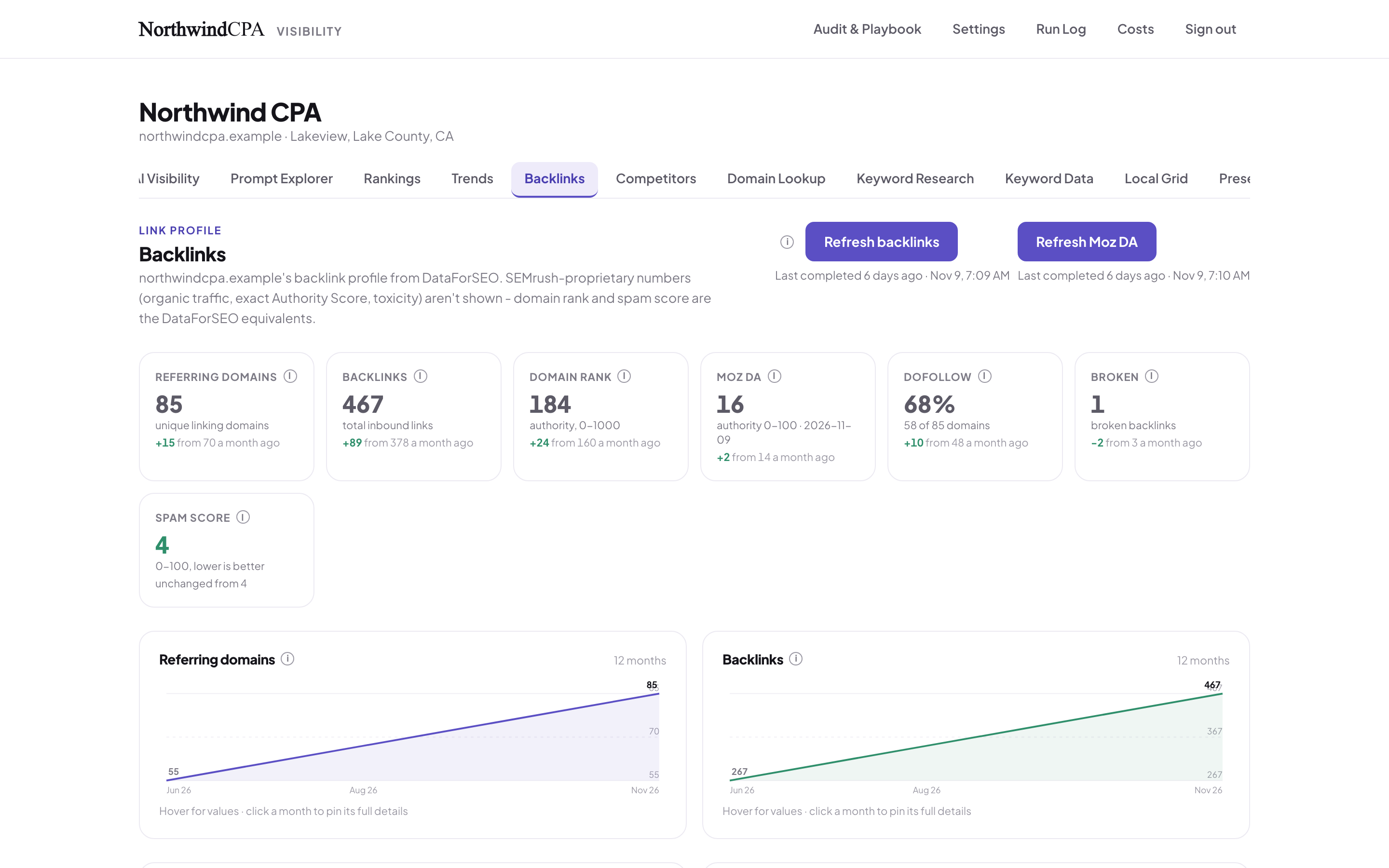
Links from other websites, growing over a year.
Leads and the funnel
From a Google search to a signed client.
This is where SEO earns its keep. Every call booked through the website calendar arrives tagged with where it came from: Google, ChatGPT, the map, or an email. Each week the app reads the CRM to see who showed up, who qualified, and who signed. Nobody has to update it by hand.
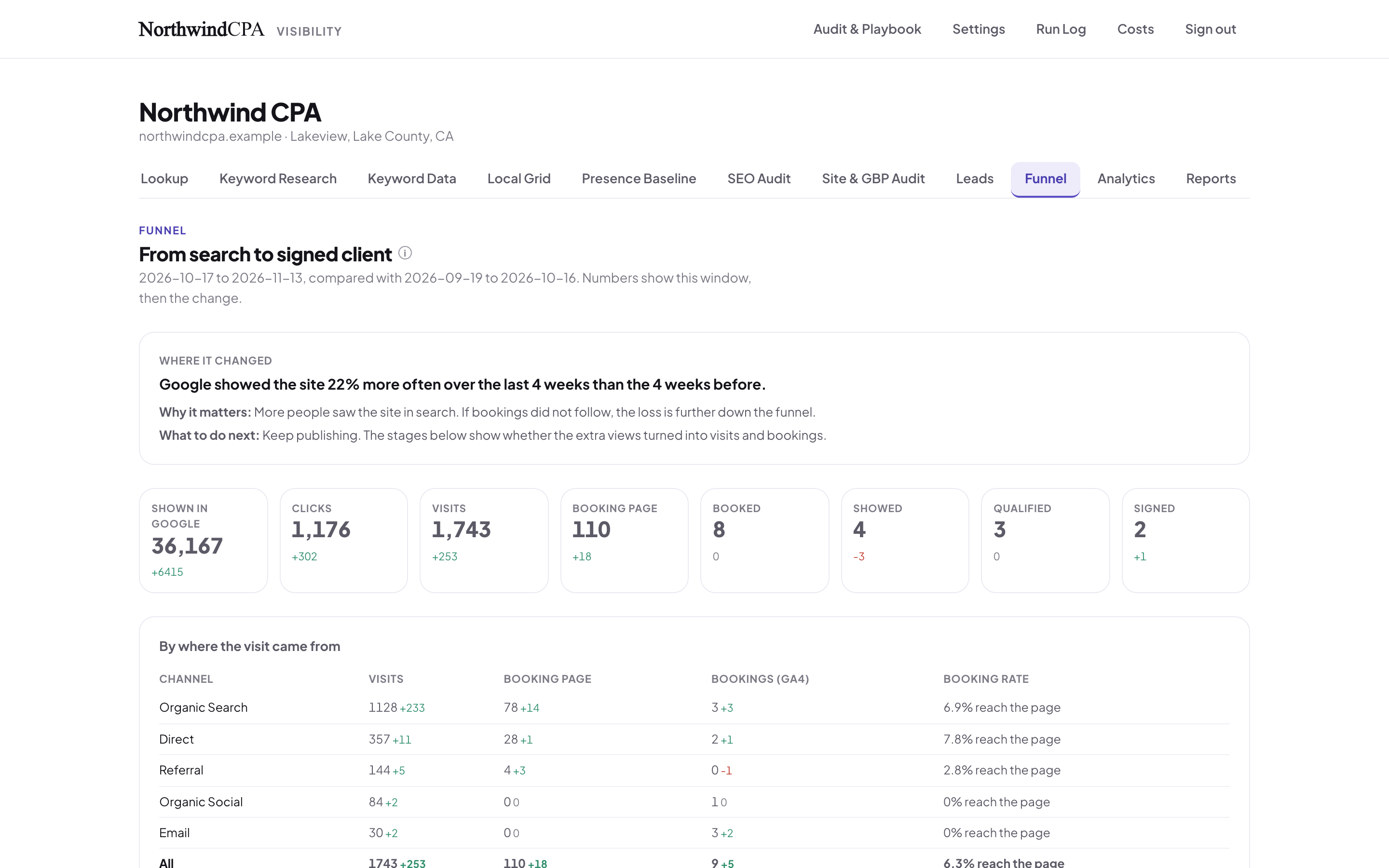
Every step from search to signed, and the first step that moved.
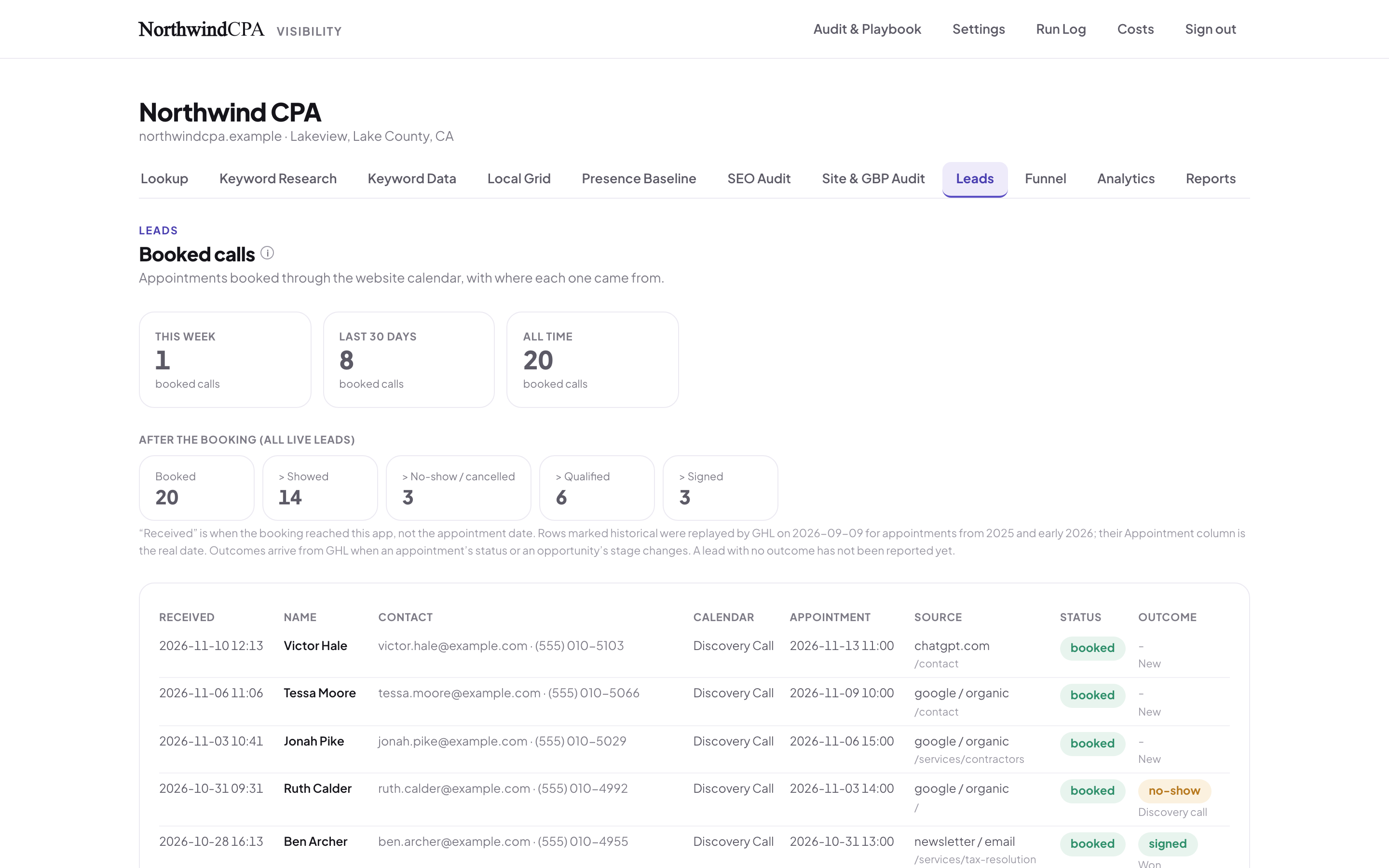
Sample booked calls, with source and outcome.
The report
A report a business owner can actually read.
Each report opens with a verdict. Then, for each thing that changed: what happened, why it matters, and what to do next, in plain words. Share it as a link that needs no login, send it on a schedule, or save it as a PDF.
Shared links you control.
Each shared link can be turned off at any time, and it counts how often it's opened. Past reports are kept just as they were sent, so a client can look back.
- One-page summary, weekly, monthly, full audit, or technical
- Any date range, compared with the one before
- Emailed weekly or monthly to a list you choose
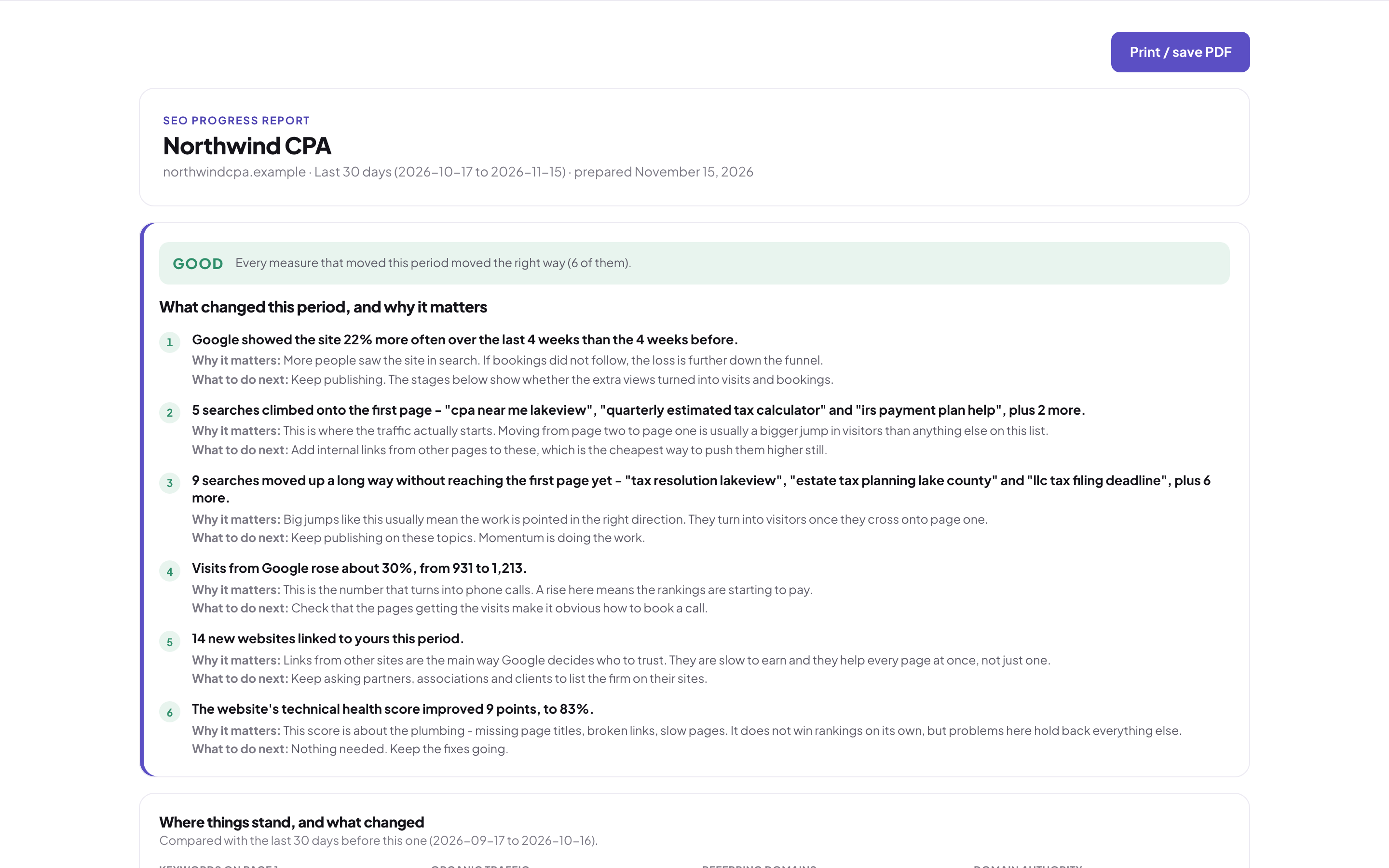
The verdict first, then the reasons, in plain words.
Runs, costs, and the assistant
It runs itself on Monday, and shows its work.
The AI check, the site audit, traffic numbers, links, authority, and rankings all run on a schedule. They're split into separate jobs, so one slow step can't stop the rest. Every run is logged, whether it worked or not.
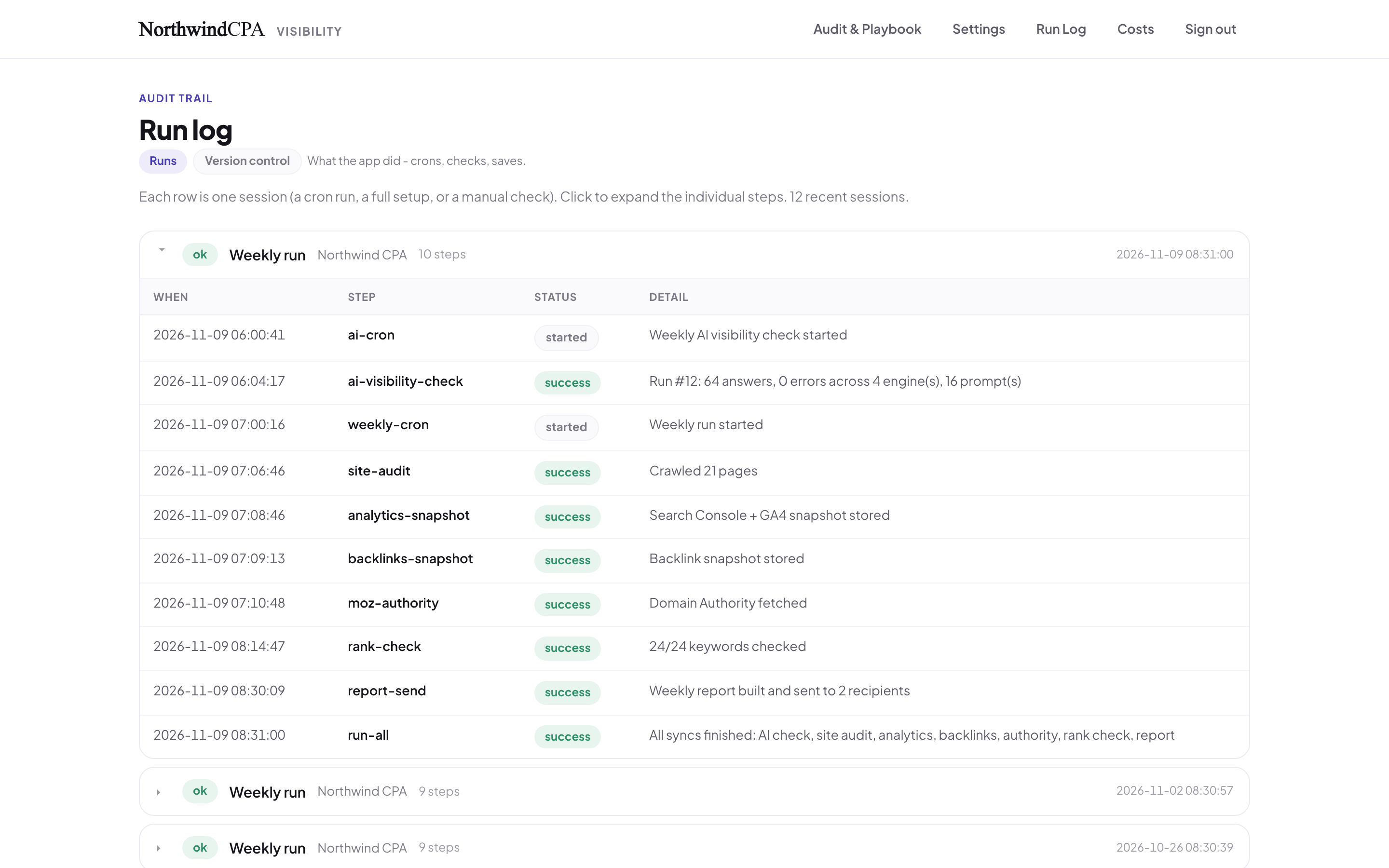
A Monday run, step by step.
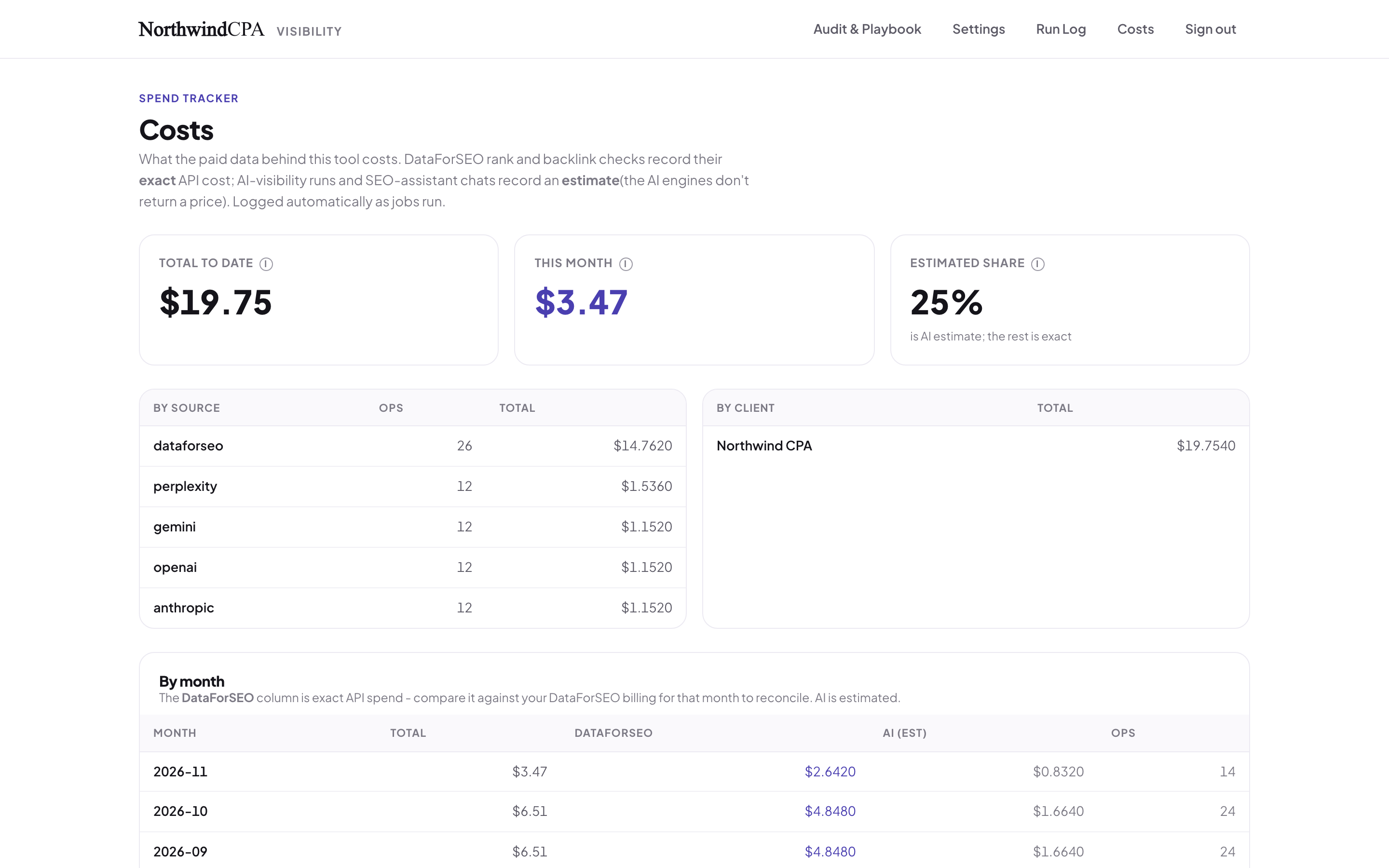
What the data and AI checks cost, by source and by month.
Ask why a number moved.
The SEO assistant answers questions like "why did this phrase jump this month?" It draws on the firm's own process notes and the tracker's data, and points to the next step.
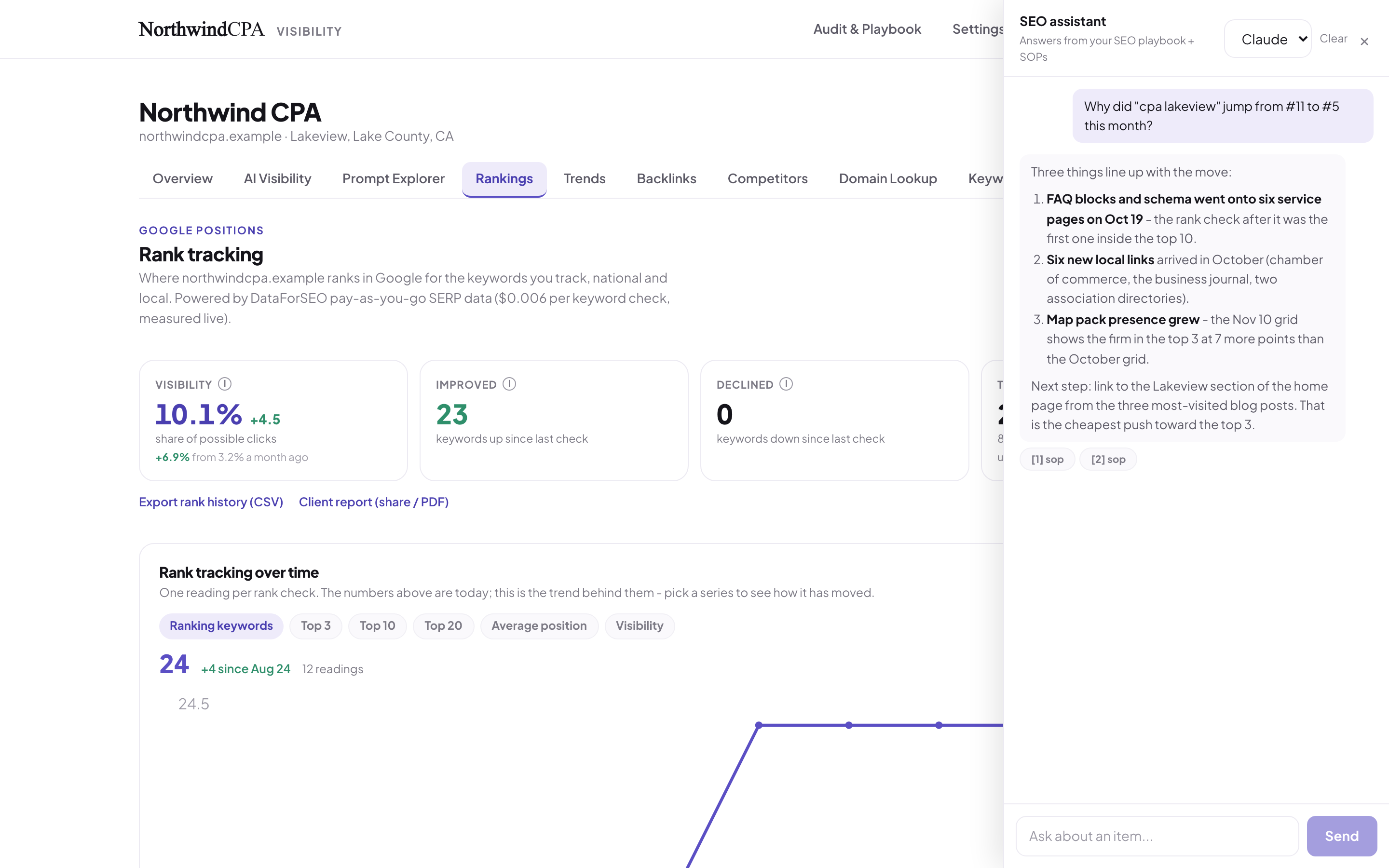
A sample question and answer. The conversation shown is made up.
Everything else in the box
The rest of what it does.
Trends for everything
48 numbers, this period against the last, each marked better, worse, or flat.
Traffic from Google's own tools
Clicks, searches, pages, and channels, straight from the firm's Google accounts.
Run everything now
One button runs every check on demand, with a "last run" time on each.
Works from the command line
A terminal tool and a read-only AI connector can pull the status. The connector can't read leads, spend money, or send email.
Locked to the right people
Access is granted and removed in the firm's own sign-in portal. The owner-only areas stay locked to the owner.
Backed up nightly
A copy outside the app every night, and a one-click export.
Search data from more than one source
Search volume and cost-per-click history for each phrase, pulled in from several data sources.
Compare two crawls
Put this week's site crawl next to the last one: page errors, status codes, and which pages carry structured data.
How it was built
Honest numbers first.
A tracker that flatters is worse than none. So the hardest rules were about not fooling the owner: never count a glitch as a drop, and never count a change in method as a win.
Bad data is retried, not recorded
If a search result comes back cut short, it's retried. It's never saved as "not ranking."
Method changes are marked
Switching a data source or changing a check is drawn on the chart, so nobody mistakes it for progress.
Every answer kept
AI answers can't be reproduced later, so every one is saved as evidence.
Pay-as-you-go data
Ranking and link data are bought per check, and each check logs its exact cost.
Built with: Next.js and TypeScript, a Postgres database, pay-per-check search data, Google Search Console and Analytics, and the four AI assistants' own APIs.
Paying for SEO and not sure it's working?
Or wondering whether ChatGPT recommends you or a competitor? It's worth an hour to find out what can be measured.
Book a call with David